
CineHD APP | Stream Movies, TV Show, Animes
Enjoy a wide range of movies, TV shows, and anime on the CineHD APK. Keep track of your favourite movies, shows, anime, actors, and studios all in one place and start streaming anytime!
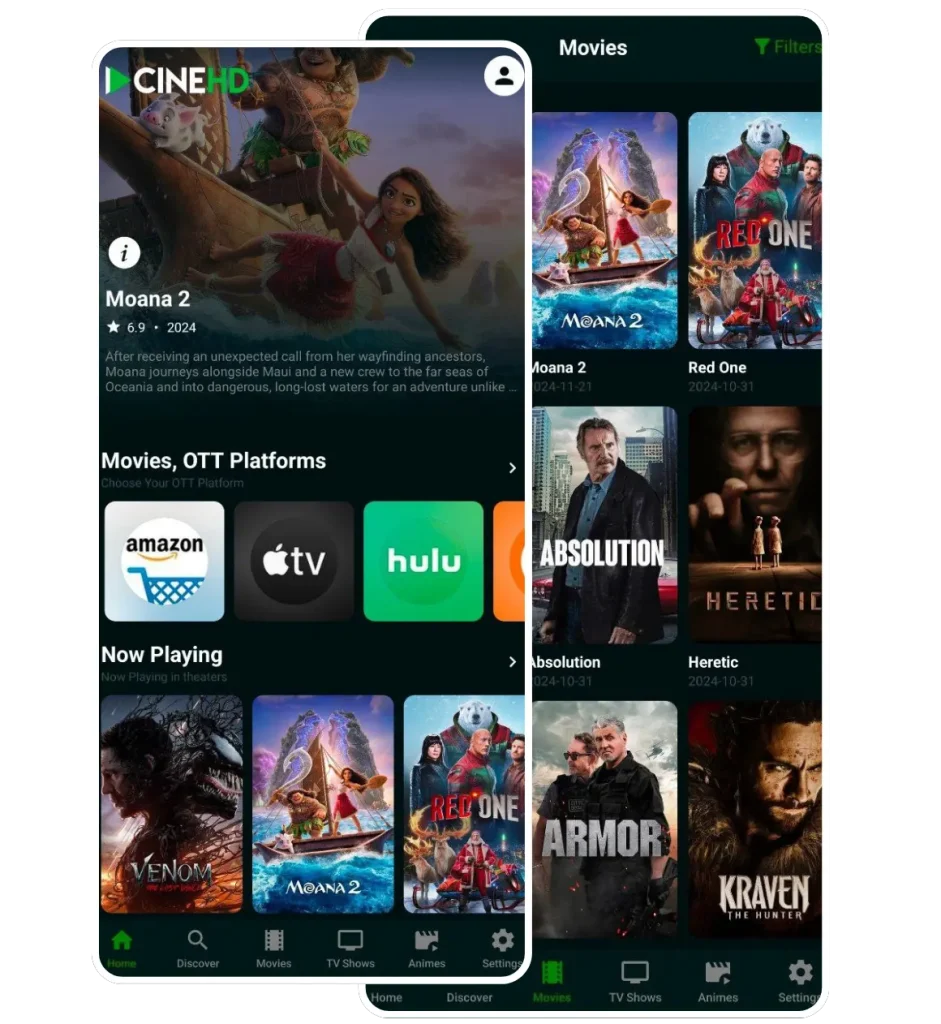
CineHD
CineHD is a free HD streaming app for Android. You can watch movies, TV shows, live sports, web series, documentaries, anime and kids shows in HD quality, all in one app.
Everything on CineHD is free. There is no subscription fee, no ads and no banners. You do not need to create an account either. Just download the app and start watching.
Most streaming apps show content from one place only. CineHD is different because it brings many OTT platforms together in a single app. You do not need a separate app for Netflix, HBO Max, Disney+, Prime Video, Hulu and more. It saves space on your phone and it makes finding something to watch much easier. The CineHD APK latest version gives you a big library of movies and series from every genre. You will find old favourites, new releases and everything in between.
About CineHD App
Watching movies and TV shows has become much easier with streaming apps. Instead of switching between different platforms, users can now find plenty of entertainment in one place. The CineHD app is one such option, offering a wide collection of movies, TV shows, web series, and anime from different countries and genres. It also comes with useful features that make browsing and watching content simple.

Top Features of CineHD
CineHD comes with several useful features that make it easy to find and watch your favourite entertainment. Here are some of its main features:
Stream Movies
Explore a huge collection of movies and watch your favourites for free. Search for any movie and start streaming with just a few taps.
Stream TV Shows
Find thousands of TV shows, from classic series to the latest releases. Watch your favourite episodes and keep up with new releases.
Quick Search
Find movies and TV shows easily with the built-in search option. Just enter a title to quickly find what you want to watch.
TV Schedule
Keep track of your favourite TV shows and stay updated on their airing schedules. Watch episodes online as they become available.
Playlist
Add your favourite movies and TV shows to a playlist so you can easily find and watch them later or share them with friends.
All in One
Find movies, TV shows, documentaries, and live TV in one place without switching between different apps.
Other Features
- Easy Installation and Large Content Library: CineHD is easy to install and gives users access to a large collection of entertainment. It offers more than 50,000 movies and 60,000 TV show episodes, giving users plenty of options to explore.
- Content from Different Countries: The app includes movies and TV shows from different countries and languages. Whether you enjoy Hollywood movies, international shows, or anime, you can explore different types of content based on your interests.
- TMDB Integration: CineHD uses TMDB data to display movie and TV show information. You can check details such as titles, descriptions, and summaries before choosing what to watch.
- Streaming Links from Multiple Sources: The app collects streaming links from different sources across the internet. This gives users more options when looking for movies and TV shows in HD quality.
- Trakt Account Support: CineHD supports Trakt account integration, making it easier to manage your watch history and keep track of the shows you follow. You can also sync your viewing activity with your Trakt account.
- Cast to Bigger Screens: Want to watch your favourite movies on a bigger screen? CineHD supports casting, allowing you to enjoy movies and TV shows on a compatible TV or other supported devices.
- Simple and Easy-to-Use Interface: The app has a clean interface that makes it easy to browse its content. You can explore different categories and find movies or shows without dealing with complicated menus.
- Regular Content Updates: CineHD updates its content library regularly with new movies and TV show episodes. This helps users discover new releases and find more things to watch.
- No VPN Required: You can access the app without setting up a VPN. This makes it easier to install and use without needing additional tools.
- Free to Use: CineHD is available without a subscription fee. Users can explore its entertainment library without paying for a monthly or yearly plan.
Overall, CineHD offers a simple way to explore movies, TV shows, and anime in one place. Its large content library, Trakt support, casting option, and easy-to-use interface make it an option worth exploring for people who enjoy watching different types of entertainment.
How to Download and Install CineHD App on Android Devices?
Follow these simple steps to download and install the CineHD APK on your Android device.
- Tap the download button at the top of the page to download the latest CineHD APK file.
- Once the download starts, open your browser’s three-dot menu and go to Downloads.
- After the APK file is downloaded, open your device’s Settings.
- Go to Security or Privacy and find the Install Unknown Apps option.
- Select your browser or file manager and allow it to install apps from unknown sources.
- Now, open the Files app and go to the Downloads folder.
- Find and tap the downloaded CineHD APK file.
- Press Install and wait for the installation to finish.
- Once installed, open CineHD from your app drawer and start exploring its content.
That’s it! CineHD is now installed on your Android device, and you can start using the app.
How to Download CineHD APK on PC?
CineHD is an Android app, so you cannot install it directly on a Windows PC. To use it on your computer, you need an Android emulator such as BlueStacks or LDPlayer. Follow these steps to install CineHD on your PC.
- Download and install an Android emulator on your computer.
- Open the emulator and complete the initial setup.
- Download the latest CineHD APK file on your PC.
- Launch the Android emulator.
- Drag and drop the CineHD APK file into the emulator, or use the Install APK option.
- Wait for the installation to complete.
- Once installed, find the CineHD app on the emulator’s home screen.
- Click the app icon to open it.
- Allow any required permissions if prompted.
- Start browsing and watching your favourite content on your PC.
Is it Safe to Use CineHD?
CineHD is a third-party Android app, so it’s important to be careful when downloading and installing it. Its safety depends on the source of the APK file. Downloading apps from unknown or untrusted websites can put your device at risk.
For better security, always download the CineHD APK from a trusted source and avoid modified or unofficial versions. You can also use a VPN to improve your online privacy. Additionally, keeping antivirus protection enabled can help detect potential threats and keep your device safer.
CineHD Troubleshooting Tips
- Update Failed: CineHD does not support automatic updates, so you may need to install new versions manually. If the update is not working, uninstall the older version, download the latest CineHD APK, and install it again on your device.
- App Lags or Crashes: If CineHD becomes slow or keeps crashing, try clearing its cache. Go to your device’s Settings > Apps > CineHD > Storage and tap Clear Cache. You can also restart your device and open the app again.
- Live TV Not Working: If the Live TV section is not loading or playing channels, check your internet connection first. You can also try using a VPN or restart the app to see if the issue is resolved.
Pros and Cons
Pros
Cons
FAQs
Final Words
CineHD APK for Android is a streaming app that offers a wide collection of movies, TV shows, and web series in one place. Its regularly updated library and simple interface make it easy for users to find and watch their favourite content.
The app also offers fast streaming links and supports different devices, including Android phones, PCs, and Firestick. However, since CineHD is a third-party app, users should be careful when downloading and installing it. Always check the APK source and consider possible security and legal risks before using it.